Purchasing
Order what is needed, before it runs out.
Suppliers, prices, purchase orders and goods receipts together. You see what to reorder before the shelf is empty.
No credit cardUnlimited membersHosted in the EU
Sound familiar?
Where the day gets lost today.
Prices live in old emails
The last quote from the supplier is in someone's mailbox. The order goes out at a price nobody checked.
Stock runs out unannounced
The first sign that something is missing is a customer waiting. Reordering happens in a hurry and costs more.
Receipts don't match orders
Goods arrive, the delivery note goes into a tray, and the invoice gets paid without anyone comparing the three.
What SAPUGO sets up
Connected tables for your work.
A starting setup like this is ready in minutes from the Inventory & purchasing system or from a description. Rename, add or remove anything later.
Suppliers
- Name
- Contact
- Payment terms
- Lead time
Products
- Name
- SKU
- Preferred supplier
- Minimum stock
- Stock on hand
Supplier prices
- Product
- Supplier
- Price
- Valid from
- Minimum quantity
Purchase orders
- Supplier
- Order date
- Lines
- Total
- Status
- Expected delivery
Goods receipts
- Purchase order
- Received on
- Lines
- Received by
- Notes
A view for every job.
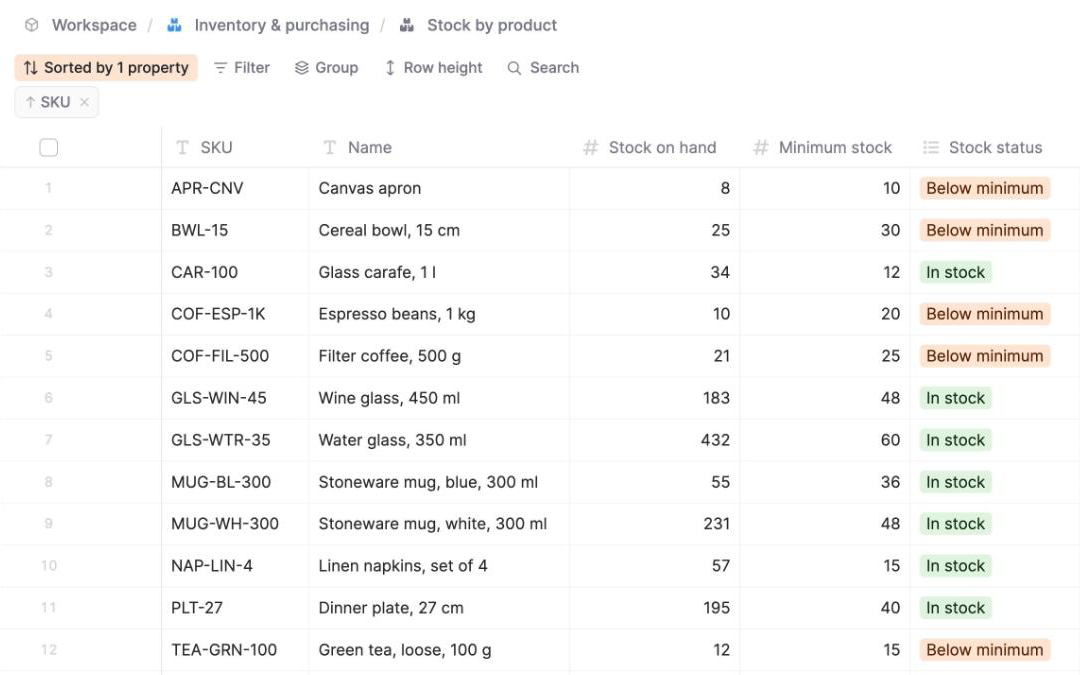
- Reorder list
- Products whose stock on hand is below the minimum, with the preferred supplier and the last price, ready to order.
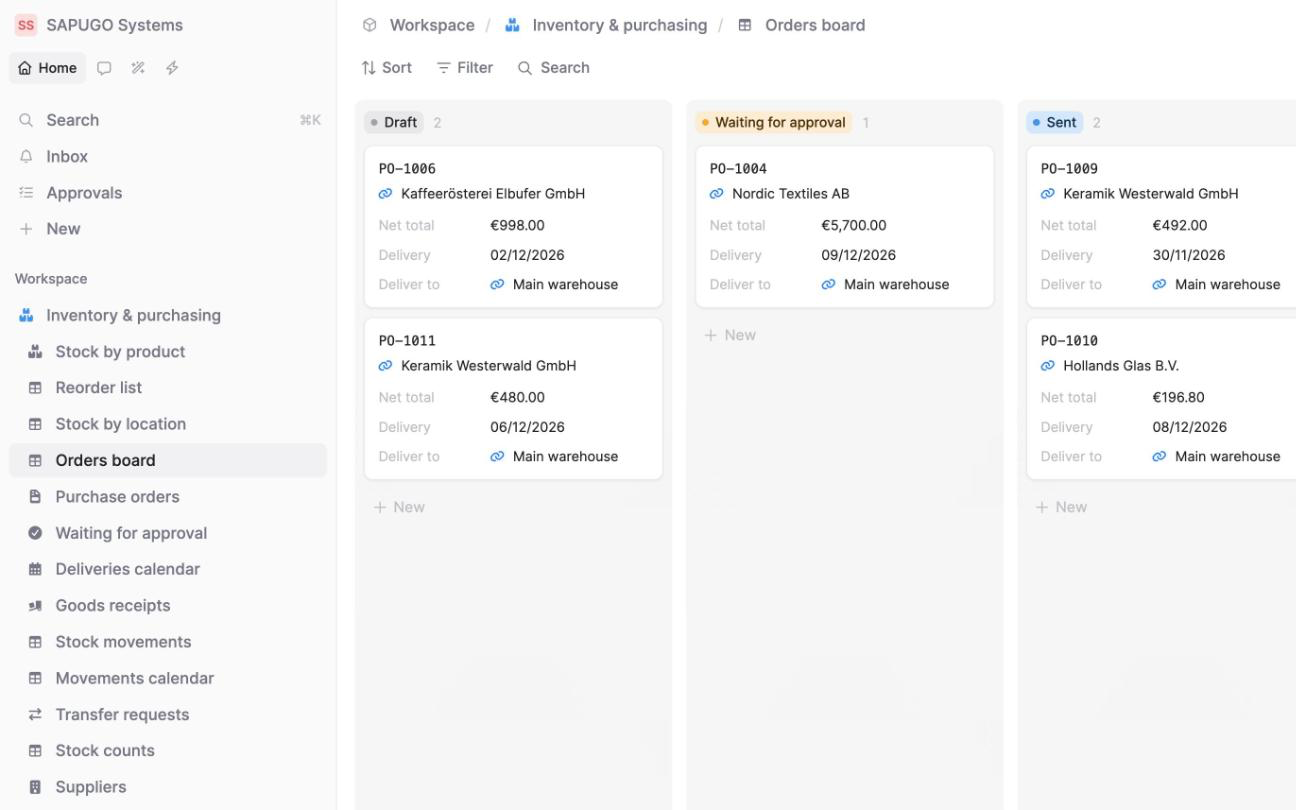
- Orders board
- Draft, sent, confirmed, partly received, received and invoiced, as columns you drag between.
- Deliveries calendar
- Every expected delivery on a calendar, so the warehouse knows what arrives when.
- Supplier record
- Open a supplier to see prices, purchase orders, goods receipts, files and comments.
Work that runs by itself.
- Purchase order PDF to the supplier
- When an order is set to sent, the Purchase order stencil fills with the lines and goes to the supplier by email.
- Reorder when stock drops
- Every morning, products below their minimum are collected into a draft purchase order per preferred supplier.
- Goods receipt updates stock
- Booking a receipt adds the quantities to stock on hand and sets the order to received when every line is in.
- Approval above a threshold
- Orders above an amount you set wait for the owner's approval before they can be sent.
Documents as PDFs: Purchase order, Goods receipt.
Everyone sees what they need.
Yes, you can.
The questions teams like yours ask before they switch, and what SAPUGO answers.
- “Can I see what to reorder without checking every shelf?”
- Yes, you can. A rollup sums the stock movements per product, and a view filtered on stock below the minimum is your reorder list.
- “Can orders above €5,000 wait for my approval?”
- Yes, you can. A workflow with an approval step holds the order until you approve it, from the email or in SAPUGO.
- “Can I keep several supplier prices per product?”
- Yes, you can. A Supplier prices table relates products to suppliers with valid-from dates, and a business rule gives each product the current price of its preferred supplier.
- “Can the warehouse book receipts without seeing prices?”
- Yes, you can. A field permission hides the price and total fields from the warehouse role, while the lines and quantities stay visible.
Where to start
Start from the system, or from a sentence.
Inventory & purchasing
For shops and distributors
Products, suppliers, stock per location, movements and purchase orders with reorder points.
Describe your business to the AI Assistant
“We buy from 40 suppliers and keep stock in two warehouses. I need purchase orders as PDFs, goods receipts and a reorder list.”
The assistant proposes tables, views, rules and workflows and builds nothing until you approve the plan. Prefer to build by hand? Everything it makes, you can make yourself.
Your data, kept apart from everyone else.
Hosted in the EU
Your workspace lives in an EU region, in its own isolated database.
Permissions down to the field
Decide who sees and changes each table, row and field, on every plan.
No lock-in
Export a whole database as SQL any time, and erase your workspace when you want.
Can I import my supplier and product lists?
Yes. Import suppliers, products and prices from Excel, CSV, JSON, XML or Airtable, map the columns, and link them afterwards.
Can suppliers receive the order as a PDF?
Yes. The Purchase order stencil produces the PDF in the supplier's language, and a workflow emails it to the supplier when the order is set to sent.
Does this replace my accounting software?
No. SAPUGO holds the orders and receipts; the bookkeeping stays in your accounting software. A workflow can pass approved supplier invoices on through its API or as a file.
Does the warehouse need a separate tool?
No. The warehouse team gets accounts at no extra cost, since every plan includes unlimited members, and sees only the views their role allows.
Set up purchasing in minutes.
Create a workspace and start from this setup, or describe your business. You can change everything later.
No credit cardUnlimited membersHosted in the EU