Wholesale & distribution
Orders, stock and invoices that agree.
Customers, products, orders, stock and invoices in one set of tables. The delivery note and the stock level come from the same record.
No credit cardUnlimited membersHosted in the EU
Sound familiar?
Where the day gets lost today.
Orders are typed twice
The customer emails the order, someone types it into the invoicing tool, and someone else updates the stock sheet. Every copy is a chance for a wrong quantity.
Stock is a guess
The spreadsheet says 40 crates, the warehouse has 12. Nobody finds out until the van is being loaded.
The credit limit lives in someone's memory
Huber GmbH is at the limit again, and the order went out anyway because the one person who knew was on holiday.
What SAPUGO sets up
Connected tables for your work.
A starting setup like this is ready in minutes from the Quotes, orders & invoices system, with stock from Inventory & purchasing, or from a description. Rename, add or remove anything later.
Customers
- Name
- Billing address
- Delivery addresses
- Price list
- Credit limit
- Open balance
Products
- SKU
- Name
- Unit
- Purchase price
- Sales price
- Minimum stock
Orders
- Customer
- Order date
- Line items
- Total
- Delivery date
- Status
Stock
- Product
- Location
- Quantity
- Last movement
Deliveries
- Order
- Delivery date
- Driver
- Status
- Signed note
Invoices
- Customer
- Orders
- Amount
- Due date
- Paid
A view for every job.
- Open orders
- A table of orders not yet delivered, grouped by delivery date, that the warehouse picks from.
- Order board
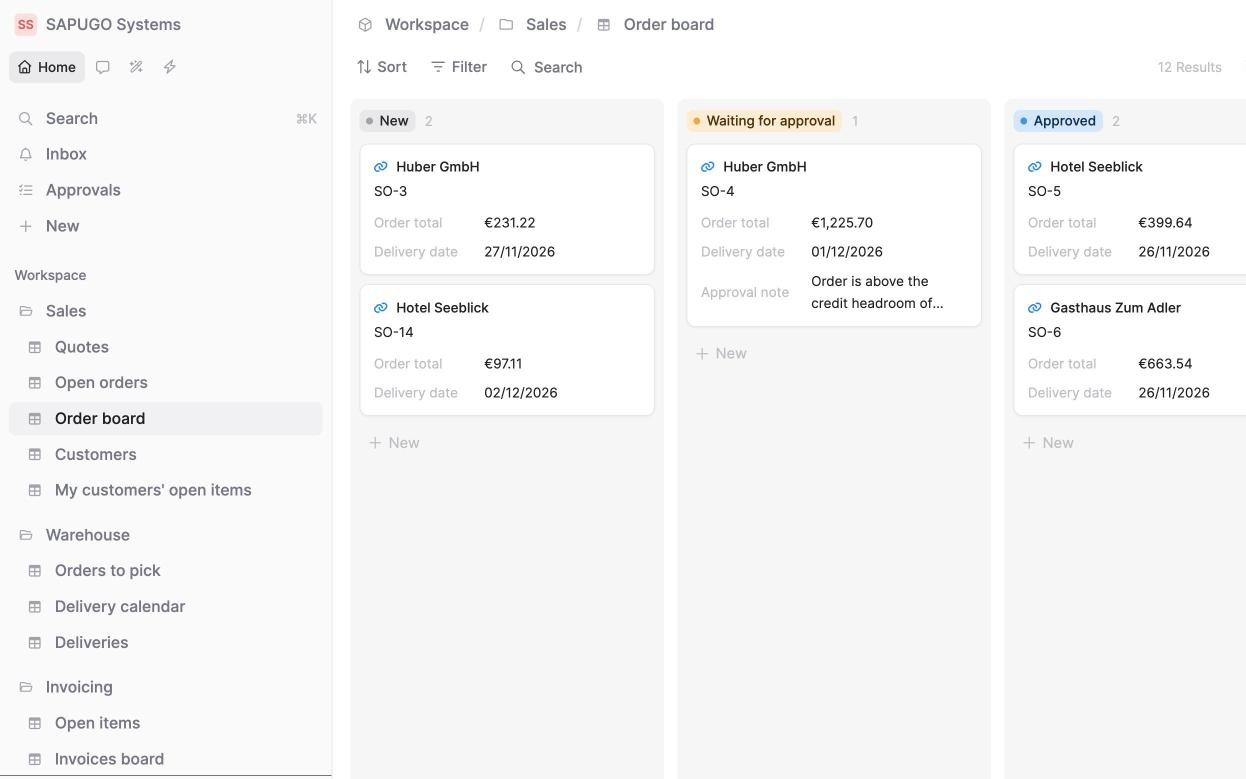
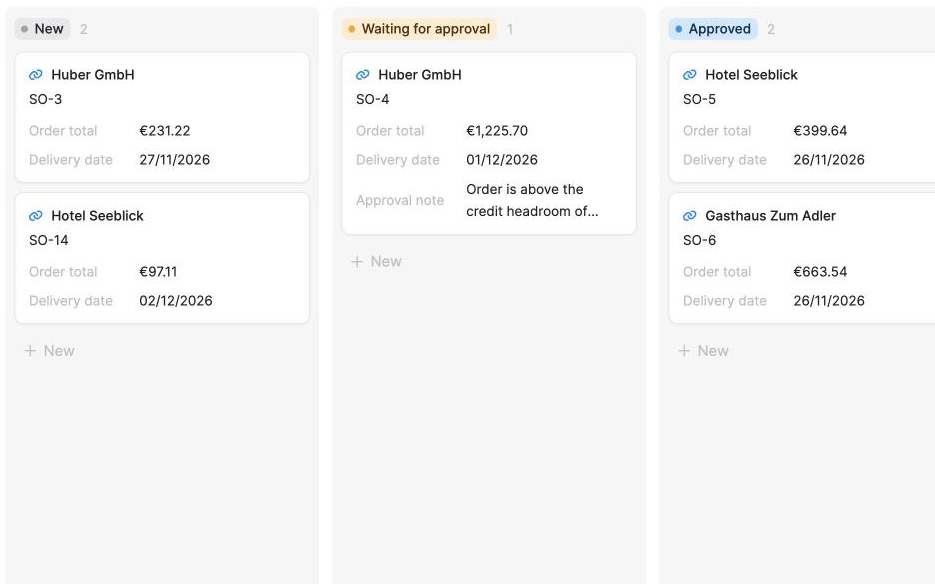
- New, approved, picked, delivered and invoiced, as columns you drag between.
- Delivery calendar
- Every delivery on a calendar by day and driver, so a van is never booked twice.
- Customer record
- Open a customer to see their orders, invoices, open balance, price list and every email they sent.
Work that runs by itself.
- Approval above the credit limit
- When an order would take a customer past their credit limit, it waits for the owner's approval before it is confirmed.
- Order confirmation by email
- When an order is confirmed, the confirmation goes to the customer as a PDF.
- Delivery note and invoice on shipment
- Marking a delivery as shipped produces the delivery note and the invoice from the same order lines.
- Reorder below minimum
- When stock for a product drops below its minimum, a purchase order draft is created for the supplier.
Documents as PDFs: Quote, Order confirmation, Delivery note, Invoice.
Everyone sees what they need.
Yes, you can.
The questions teams like yours ask before they switch, and what SAPUGO answers.
- “Can I stop an order going out when the customer is over their credit limit?”
- Yes, you can. A business rule checks the open balance against the credit limit inside the save, and a workflow sends the order to you for approval instead of letting it through.
- “Can the warehouse see what to pick without seeing our margins?”
- Yes, you can. The warehouse role gets the Open orders view, and a field permission hides purchase prices and margins from it.
- “Can I have different prices for different customers?”
- Yes, you can. Price lists are their own table, each customer is linked to one, and the order line takes its price through that relation.
- “Can I see stock per warehouse without a count every Friday?”
- Yes, you can. With Inventory & purchasing, every goods receipt and every sale or transfer is a stock movement, and the Stock table adds them up per product and location.
Where to start
Start from the system, or from a sentence.
Quotes, orders & invoices
For product businesses and wholesalers
Customers, products, quotes, orders, delivery notes and invoices as PDFs. Credit limits and order approval built in.
Describe your business to the AI Assistant
“We are a beverage wholesaler with 400 products and two warehouses. We take orders by email and phone, deliver with our own vans, and invoice weekly.”
The assistant proposes tables, views, rules and workflows and builds nothing until you approve the plan. Prefer to build by hand? Everything it makes, you can make yourself.
Your data, kept apart from everyone else.
Hosted in the EU
Your workspace lives in an EU region, in its own isolated database.
Permissions down to the field
Decide who sees and changes each table, row and field, on every plan.
No lock-in
Export a whole database as SQL any time, and erase your workspace when you want.
Can I import my products and customers?
Yes. Import from Excel, CSV, JSON or XML, or straight from Airtable. Map the columns once and link products to orders afterwards.
Do sales reps and warehouse staff each need a licence?
No. Every plan includes unlimited members. You pay for capacity: 100,000 records on Plus, 250,000 on Pro and 1,000,000 on Business.
A customer wants to send orders by EDI. Can we take them?
Yes. Workflows include an EDIFACT step, and the HTTP step, the API and webhooks cover customers who send orders another way. There are no named integrations; everything goes through those.
Where is our data, and can we get it out?
In an isolated database for your workspace, hosted in the EU. Export any table to Excel, CSV, JSON or XML, or take a full SQL export at any time.
Set up wholesale & distribution in minutes.
Create a workspace and start from this setup, or describe your business. You can change everything later.
No credit cardUnlimited membersHosted in the EU