Inventory
Stock you can trust, in every location.
Every movement in and out is recorded per location. Stock on hand is a number you can trust, and minimum levels warn you in time.
No credit cardUnlimited membersHosted in the EU
Sound familiar?
Where the day gets lost today.
The spreadsheet is always behind
Goods go out faster than anyone types. The number on screen is yesterday's.
Two locations, one list
What is in the shop and what is in the warehouse share one column. Transfers vanish.
Counts take a weekend
Stocktaking means closing, counting on paper, and finding differences nobody can explain.
What SAPUGO sets up
Connected tables for your work.
A starting setup like this is ready in minutes from the Inventory & purchasing system or from a description. Rename, add or remove anything later.
Products
- Name
- SKU
- Unit
- Minimum stock
- Stock on hand
- Supplier
Locations
- Name
- Type
- Address
- Responsible
Stock movements
- Product
- From location
- To location
- Quantity
- Date
- Reason
Stock counts
- Location
- Date
- Counted by
- Status
Count lines
- Stock count
- Product
- Expected
- Counted
- Difference
Suppliers
- Name
- Contact
- Lead time
- Products
A view for every job.
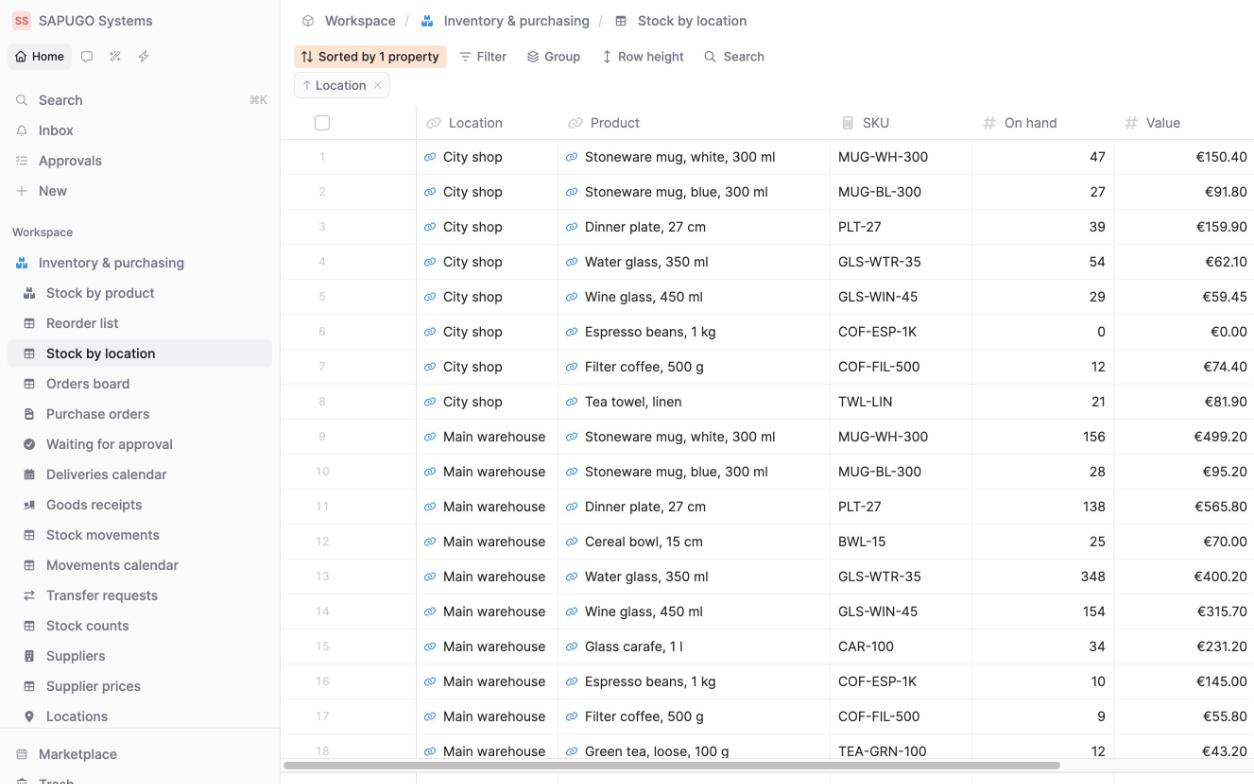
- Stock by location
- One row per product and location with stock on hand and value, added up from the booked movements.
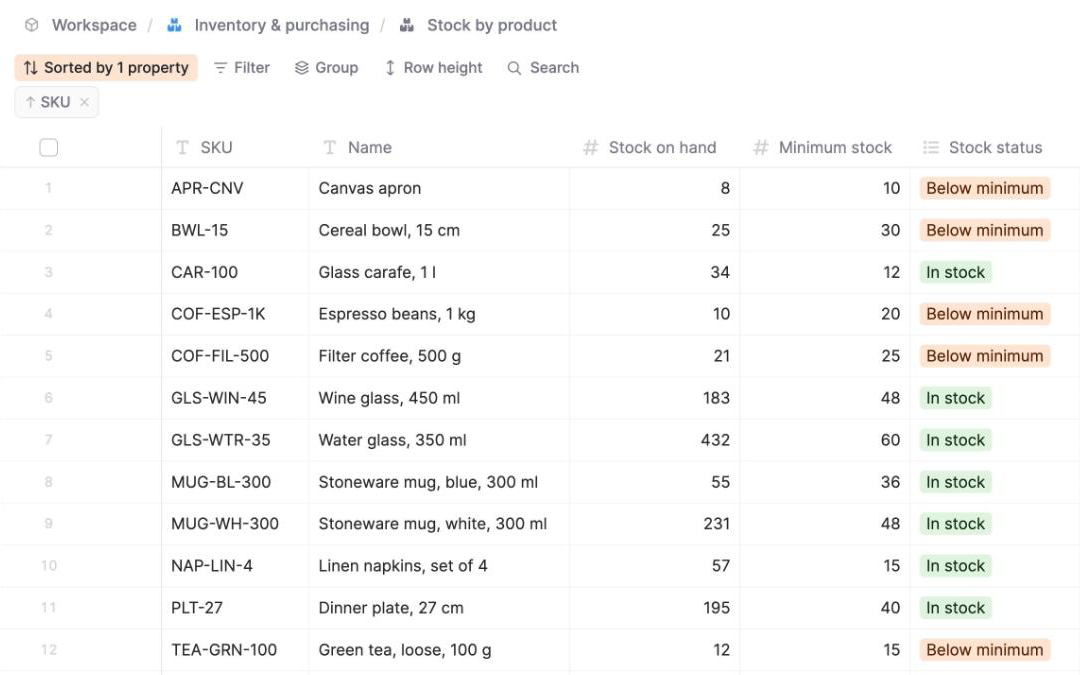
- Below minimum
- Products whose stock is under the minimum, with supplier and lead time, ready for purchasing.
- Movements calendar
- Goods in, goods out and transfers by day, so you can see what happened when.
- Product record
- Open a product to see every movement, the counts it appeared in, its suppliers and files.
Work that runs by itself.
- Goods receipt books stock in
- When a purchase order is received, a movement per line adds the quantity to the receiving location.
- Low stock alert
- When stock on hand falls below the minimum, purchasing gets an email and the product goes into a draft purchase order for its supplier.
- Count closes with corrections
- When a stock count is approved, a correcting movement per difference brings stock on hand to the counted value.
- Monthly stock report
- On the first of the month, stock per location is written to an Excel file and emailed to the owner.
Documents as PDFs: Transfer note, Stock count sheet.
Everyone sees what they need.
Yes, you can.
The questions teams like yours ask before they switch, and what SAPUGO answers.
- “Can stock on hand update itself when goods move?”
- Yes, you can. Business rules add up the booked movements per product and location as each one is saved. Book a movement and the number changes.
- “Can I stop a movement that would take stock negative?”
- Yes, you can. A business rule checks the available quantity inside the save and rejects the movement with a message.
- “Can the shop see only its own stock?”
- Yes, you can. An access filter on stock and movements shows the shop role only the locations its members work at.
- “Can I count stock with a tablet and a form?”
- Yes, you can. Starting a count lists every product at the location. Enter the counted quantities on a tablet in the browser, and a formula shows the difference to the expected stock.
Where to start
Start from the system, or from a sentence.
Inventory & purchasing
For shops and distributors
Products, suppliers, stock per location, movements and purchase orders with reorder points.
Describe your business to the AI Assistant
“We stock 1,200 products in a warehouse and a shop. I need stock per location, goods in and out, regular counts and a warning when something runs low.”
The assistant proposes tables, views, rules and workflows and builds nothing until you approve the plan. Prefer to build by hand? Everything it makes, you can make yourself.
Your data, kept apart from everyone else.
Hosted in the EU
Your workspace lives in an EU region, in its own isolated database.
Permissions down to the field
Decide who sees and changes each table, row and field, on every plan.
No lock-in
Export a whole database as SQL any time, and erase your workspace when you want.
Can I import my product list and opening stock?
Yes. Import products and locations from Excel, CSV, JSON, XML or Airtable, then import the opening stock as a first movement per product.
How many products can I manage?
Records per database are 2,000 on Free, 100,000 on Plus, 250,000 on Pro and 1,000,000 on Business. Movements count as records too, so pick the plan by how much moves.
Does it track lot or serial numbers?
If you need them. Add a Lot or Serial field to the movements, or a Lots table related to products. The setup is yours to change, with the AI Assistant or by hand.
Can I connect my shop system?
Through the API and webhooks. A sale posted to the API becomes a movement, and a webhook tells your shop when stock changes. There are no named integrations; the API, webhooks and the HTTP step are the way in.
Set up inventory in minutes.
Create a workspace and start from this setup, or describe your business. You can change everything later.
No credit cardUnlimited membersHosted in the EU